The Best Cinematic Photo Editing App
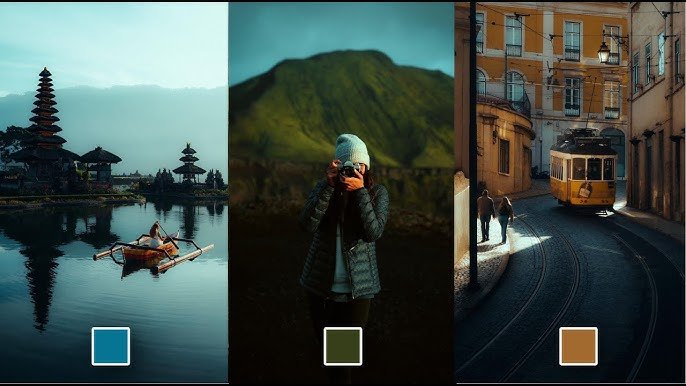
The quest for the best cinematic photo editing app is a search for a tool that transcends basic adjustments, allowing you to infuse your still images with the depth, drama, and narrative quality of a film frame. Cinematic editing is about evoking emotion, controlling light and shadow with intention, and applying a cohesive color grade that tells a story.
Based on current capabilities, workflow efficiency, and creative potential, one app stands out as the most powerful and versatile choice for most creators.
The Top Choice: Adobe Lightroom (Desktop & Mobile)
Adobe Lightroom remains the industry-standard frontrunner for achieving cinematic looks, thanks to its unparalleled combination of professional-grade tools, extensive learning resources, and seamless ecosystem.
Why Lightroom is the Best Overall Cinematic Editing App:
-
Advanced Color Grading Tools: The heart of cinematic editing lies in color. Lightroom’s Color Grading panel (with separate wheels for Shadows, Midtones, and Highlights) is a direct translation of a video colorist’s toolkit. You can craft rich, nuanced looks by shifting tones precisely teal and orange contrasts, desaturated shadows, or nostalgic film tints.
-
Precision Masking with AI: Modern cinema uses light to guide the eye. Lightroom’s AI-powered masking (Select Subject, Select Sky, Background) allows you to dodge, burn, and color-correct specific elements with incredible accuracy. You can brighten a subject, darken a distracting background, or change the mood of a sky independently.
-
Vast Ecosystem of Cinematic Presets: Lightroom boasts the largest marketplace for professional-grade, cinematic presets (like those from RNI, VSCO, and CineGrain). These presets offer instant, high-quality starting points that emulate specific film stocks or director’s styles, which you can then fine-tune to perfection.
-
Non-Destructive Editing & Syncing: Your edits are never permanent. You can experiment fearlessly and sync the edits across all your devices via the cloud, allowing you to start on a desktop and polish on a mobile device.
-
Superior Detail & Noise Control: Cinematic images often have a specific texture. Lightroom’s Detail and Noise Reduction sliders (enhanced by AI in recent updates) let you sharpen eyes or smooth skin with control, avoiding an overly “digital” look.
How to Create a Cinematic Photo in Lightroom:
-
Step 1 (Base): Lower contrast slightly, then rebuild it using the Curves tool for an “S-curve” or a lifted black point (fade).
-
Step 2 (Color): Use the Color Grading panel. Add blue/teal to Shadows and warm amber to Highlights for a classic blockbuster look.
-
Step 3 (Local Adjustments): Use a Radial Gradient to create a subtle vignette or “spotlight” effect on your subject. Use a Brush to enhance catchlights in the eyes.
-
Step 4 (Texture): Add subtle Grain and reduce Clarity slightly for a more organic, filmic feel.
Other Exceptional Contenders for Cinematic Editing
Depending on your specific needs and platform, these apps are also superb choices.
1. For Mobile-First Creators: Snapseed (Free)
Google’s Snapseed is a surprisingly powerful free tool. Its “Curves” and “Selective” tools are key for cinematic edits. The “Glamour Glow” filter (used subtly) can mimic a pro-mist filter’s halation effect. It’s the best free option for building cinematic looks directly on your phone.
2. For Authentic Film Emulation: RNI Films
Really Nice Images (RNI) Films excels at one thing: scientifically accurate, beautiful film simulations. If your goal is to make a digital photo look exactly like it was shot on Kodak Portra 400 or Cinestill 800T, RNI is unbeatable. It works as a standalone app or as a Lightroom/Photoshop plugin.
3. For Advanced Compositing & Effects: Affinity Photo
If your cinematic vision involves major compositing—adding smoke, changing skies, or creating complex digital art—Affinity Photo is a one-time-purchase powerhouse rivaling Photoshop. Its layer-based, non-destructive workflow is essential for building images from multiple elements.
4. For AI-Powered Artistic Transformation: Luminar Neo
Luminar Neo shines with AI tools that can dramatically alter atmosphere. Features like “AI Sky Replacement” (with realistic relighting), “Atmosphere” (add fog/mist), and “Sunrays” allow for the creation of deeply dramatic, sometimes surreal, cinematic scenes with less manual work.
Key Features of a True Cinematic Editing App
Regardless of which app you choose, the best ones will enable you to execute these cinematic techniques:
-
Precision Color Grading: Separate control over the color of shadows, midtones, and highlights.
-
Advanced Contrast Control: Using curves and levels to shape contrast, not just a single slider.
-
Selective Editing: The ability to dodge, burn, and adjust specific areas of the frame.
-
Texture Management: Control over clarity, dehaze, and grain.
-
Aspect Ratio Tools: Easy cropping to cinematic ratios like 2.35:1 or 16:9 with letterboxing.
Conclusion
For the vast majority of photographers seeking the best cinematic photo editing app, Adobe Lightroom provides the most complete, professional, and scalable solution. Its toolset is purpose-built for the nuanced color work that defines the cinematic style, and its preset ecosystem is unrivaled.
Choose Lightroom if: You want the most powerful all-in-one suite for color grading and non-destructive editing.
Choose Snapseed if: You need a brilliant, free tool for mobile editing.
Choose RNI Films if: Your primary goal is authentic film stock emulation.
Choose Affinity Photo/Luminar Neo if: Your cinematic vision relies heavily on advanced compositing or AI-driven atmospheric effects.
The right tool empowers your vision. Start with a strong composition, shoot in RAW if possible, and use these apps to paint with light and color, transforming your photograph into a timeless cinematic still.